
Every CPA firm owner has heard the AI pitch by now. Some vendors promise it will prepare returns on its own. Others warn that firms that wait will be left behind. Most partners we speak to just want a straight answer: where does AI actually save time, and where does it create risk?
The short answer: AI for CPA firms works best on the repetitive steps around the work, like reading documents, sorting transactions, drafting emails and flagging numbers that look wrong. It does not replace professional judgment, review or sign-off. Start with one workflow, keep a person reviewing every output, and protect client data before you scale.
The profession agrees this matters. In the AICPA's 2026 PCPS CPA Firm Top Issues Survey, managing change around technology and AI ranked as the No. 1 issue firms expect to face over the next five years, across every firm size.
| Quick answers Where does AI help most? Document intake, data extraction, transaction coding, first drafts and review flags. What should AI never do alone? Make judgment calls, sign returns or send client advice without review. Is it safe for client data? Only with a written security plan, approved tools and no client data in public AI tools. How should a small firm start? Pick one workflow, test it for 30 days and measure the hours saved. Will AI replace my staff? No. It changes what your staff spend time on. |
What does AI for CPA firms actually mean?
AI for CPA firms is software that reads, sorts, drafts or checks accounting and tax information so your team spends less time on repetitive steps and more time on review and advice.
In practice, it falls into a few groups:
• Document AI reads PDFs, scans and photos, and pulls out the numbers you need, such as W-2s, 1099s, bank statements and invoices.
• Bookkeeping AI suggests how to code bank and card transactions based on past patterns.
• Generative AI drafts text: client emails, engagement letter sections, meeting summaries and first drafts of research memos.
• Review AI compares this year with last year, flags unusual changes and checks for missing items.
None of these do the work of a CPA. They take the first pass, so your people start from a draft instead of a blank page, and then apply judgment.
Where does AI help a CPA firm today?
AI helps most where the work is high-volume, rule-based and easy to check. It helps least where the answer depends on judgment, client context or professional standards.
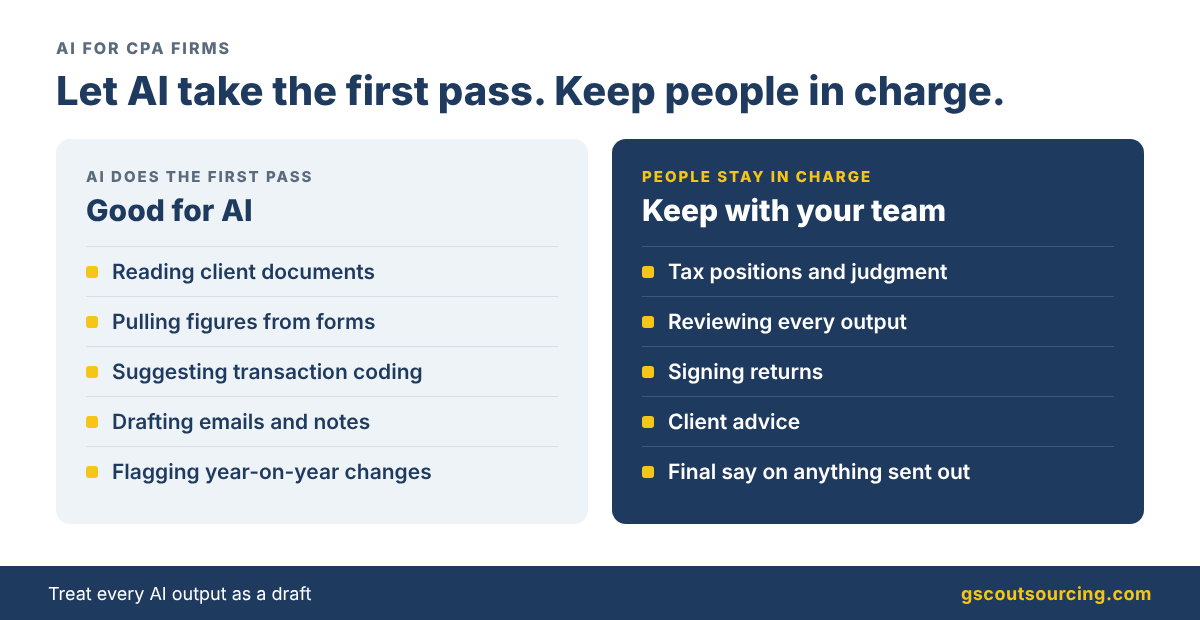
| Area | What AI does well | What a person must still do |
| Document intake | Sorts uploads, reads forms, pulls out figures | Check missing or unusual documents |
| Bookkeeping | Suggests transaction coding, matches receipts | Approve coding, handle exceptions, reconcile |
| Tax preparation | Prepares workpapers, compares with last year | Make positions, review and sign the return |
| Review | Flags variances and missing items | Decide what matters and why |
| Client communication | Drafts emails, reminders and meeting notes | Edit, add advice, send |
| Research | Summarizes rules, gives a first draft | Verify every citation against the source |
Month-end close is one of the clearest wins. We've covered it in detail in how AI is changing month-end close, so this guide focuses on the rest of the firm.
| See how an AI-augmented team works in practice At GSC, AI takes the first pass and a person reviews every output before it reaches a client. Here's how our workflow is set up. See our technology → |
What mistakes should CPA firms avoid with AI?
The biggest risks are not the technology. They are client data going into the wrong tool, outputs going out unreviewed, and firms buying tools before fixing the process.
1. Pasting client data into public AI tools. Free chat tools may keep what you type. Use only tools your firm has approved and checked.
2. Skipping review. AI can sound confident and still be wrong, especially on tax law. Treat every output as a first draft.
3. Automating a messy process. If your intake checklist is unclear, AI will just make the mess faster. Fix the steps first.
4. Buying five tools at once. Each tool needs setup, training and a security check. Start with one.
5. No written policy. Staff will use AI anyway. A one-page policy that says which tools are allowed and for what keeps everyone safe.
6. Leaving billing unchanged. If AI saves hours, hourly billing can shrink your revenue. Many firms are reviewing fixed-fee or value pricing alongside AI.
How do you keep client data safe when using AI?
Treat an AI tool like any other vendor that touches client data: it must fit inside your written information security plan, and client data should never go into a tool you haven't approved.
Tax and accounting firms that handle client financial data are covered by the FTC Safeguards Rule, which requires a written information security plan (WISP). The IRS's Publication 4557, Safeguarding Taxpayer Data, sets out baseline protections such as multi-factor authentication. Before you add an AI tool, check:
• Is it listed in your WISP, with a named person responsible?
• Do the vendor's terms say your data won't be used to train their models?
• Is data encrypted in transit and at rest?
• Can you control who on your team has access?
• Can you remove or anonymize client details before the AI sees them?
The same questions apply to any outside provider. Our guide to five data security questions to ask your provider goes through them one by one, and our data security page shows how we handle client data.
How can a small CPA firm start with AI in 30 days?
Pick one workflow, set rules, run a small test, then decide whether to scale. Thirty days is enough to see real numbers.
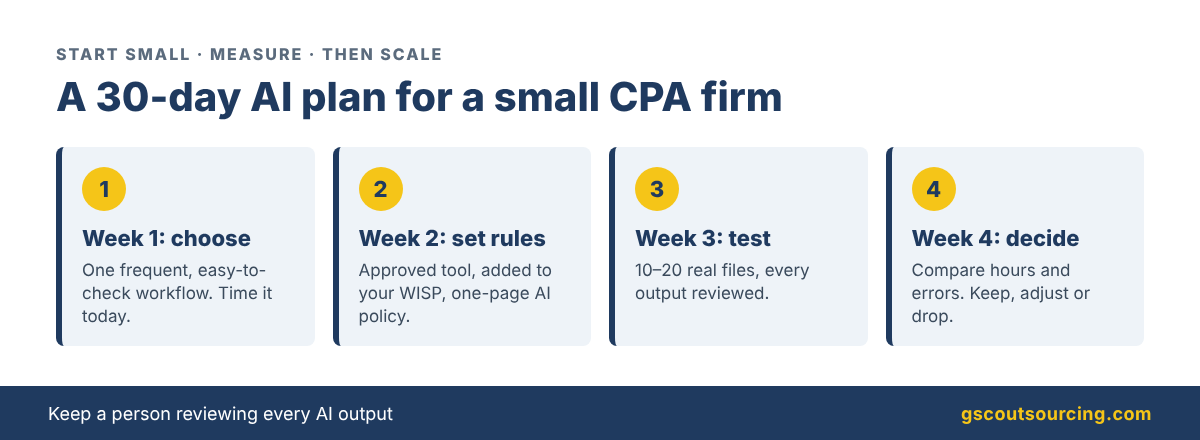
1. Week 1: choose one workflow. Pick a task that is frequent, repetitive and easy to check, such as client document intake or bank transaction coding. Write down how long it takes today.
2. Week 2: set the rules. Choose an approved tool, add it to your WISP, and write a one-page AI policy. Decide who reviews outputs.
3. Week 3: test on real work. Run it on 10 to 20 client files with full review. Note every error the AI makes.
4. Week 4: measure and decide. Compare hours and error rates with week 1. Keep it, adjust it or drop it, then pick the next workflow.
| Short on people to run the pilot? AI frees up hours, but someone still has to prepare, review and follow up. Explore offshore staffing → |
How do you know if AI is working?
Measure time saved and quality, not how many tools you've bought. If hours per file fall and review notes don't rise, it's working.
• Hours per return or per client close, before and after
• Turnaround time from complete documents to ready for review
• Review notes per file: if they go up, the AI output needs more checking
• Write-offs on fixed-fee work
• Staff feedback: whether people use the tool or work around it
AI also doesn't solve a capacity problem on its own. Firms still need trained people to review, advise and manage clients, which is why many pair AI with extra staff. We explain that model in why accounting firms are turning to offshore staffing in 2026.
Frequently asked questions
How are CPA firms using AI in 2026?
Most firms use AI for the first pass on repetitive work: reading client documents, coding transactions, drafting emails and summaries, and flagging unusual numbers for review. A person still reviews the output and makes the decisions. Managing this change is now the top long-term issue in the AICPA's 2026 firm survey.
Can AI prepare tax returns on its own?
No. AI can gather documents, extract figures and prepare workpapers, but tax positions, review and signing stay with a qualified preparer. Treat every AI output as a draft that someone checks against the source documents and the rules before it goes anywhere near a filed return.
Is it safe to put client data into ChatGPT or similar tools?
Not into free or public versions without safeguards. Use only tools your firm has approved, listed in its written information security plan and checked for data handling. Where possible, remove or anonymize client details first, and never paste full returns or bank statements into an unapproved tool.
What is the best first AI project for a small CPA firm?
Pick something frequent, repetitive and easy to check, such as client document intake or bank transaction coding. Measure how long it takes now, test the tool on 10 to 20 files with full review for a month, and keep it only if hours drop without more errors.
Will AI replace accountants at my firm?
No. AI changes what accountants spend time on. It takes over data entry and first drafts, while people handle review, judgment and client advice. Most firms find they still need more skilled people, just doing different work, especially during busy season.
Do CPA firms need an AI policy?
Yes. Staff will try AI tools whether or not you have rules. A short written policy should say which tools are approved, what client data can and can't go into them, who reviews outputs, and how the tools fit into your written information security plan.
| Get the benefits of AI without the risk AI works best for CPA firms when it sits inside a careful process. That's how GSC Outsourcing has worked with accounting firms since 2020. Book a free 30-minute call → |
Related reading: How AI is changing month-end close (without replacing accountants) · Software for CPA Firms in 2026: The Tools a Small Firm Actually Needs (and How to Choose) · AI Bank Reconciliation: How It Works and What You Still Check
